

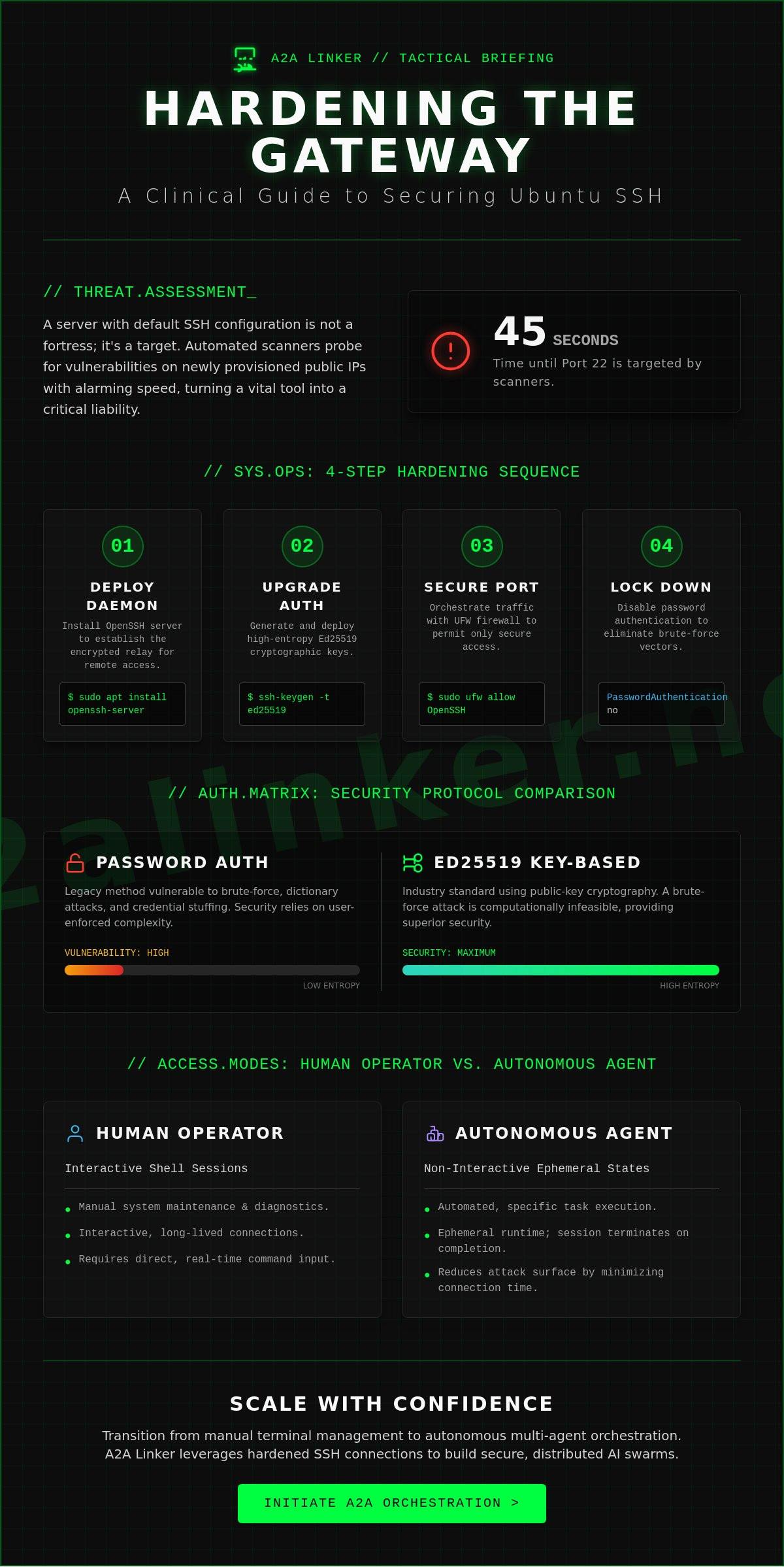
SYS.01 // ENTRY. A server without secure remote access is a static silo. Technical telemetry from 2023 indicates that automated scanners target port 22 on new public IPv4 addresses within 45 seconds of provisioning. You understand that reliable terminal access is the baseline for any orchestration layer; however, connection timed out errors and brute-force vulnerabilities often turn a functional utility into a security liability. It's time to move past default configurations that favor convenience over architectural integrity.
This guide provides the specific sequence to enable ssh ubuntu with clinical precision. We'll execute a hardened implementation of OpenSSH to facilitate secure handoffs between human operators and autonomous agents. You will learn to establish key-based authentication, configure UFW firewall rules, and eliminate the configuration drift that affects unmanaged nodes. This process ensures your server remains a secure, ephemeral runtime state rather than a vulnerable target for external actors.
Key Takeaways
- Establish architectural clarity by deploying the openssh-server package to facilitate encrypted network services and remote terminal access.
- Execute a clinical implementation to enable ssh ubuntu, ensuring repository synchronization and service persistence across system reboots.
- Harden your connection against brute-force vulnerabilities by replacing standard passwords with high-entropy Ed25519 cryptographic key pairs.
- Orchestrate inbound network traffic via Uncomplicated Firewall (UFW) to permit secure access while preventing accidental system lockout.
- Transition from manual terminal management to autonomous multi-agent orchestration for distributed AI swarms.
SYS.01 // The Architecture of Remote Access: Understanding SSH on Ubuntu
Secure Shell (SSH) is the baseline for encrypted network services. It facilitates a secure channel over unsecured networks by using public-key cryptography to authenticate the remote computer. The Secure Shell (SSH) protocol operates on a standard client-server model. On Ubuntu, this architecture is split between ssh-client, used to initiate connections, and openssh-server, which listens for incoming requests. To enable ssh ubuntu environments, the administrator must install the server components and configure the daemon to accept traffic.
By default, the service listens on TCP port 22. This port is a common denominator for automated brute-force scanning. Statistics from network security sensors indicate that new public IP addresses are often targeted by port 22 scans within 60 seconds of going live. Securing this entry point is the first step in building a resilient orchestration layer. In modern AI agent-to-agent (A2A) networking, SSH serves as the transport mechanism. It allows distributed agents to inspect, reason, and delegate tasks across a secure relay broker without exposing the underlying system to plaintext vulnerabilities.
The Functional Utility of OpenSSH
OpenSSH is the industry standard for Linux remote management. It replaced legacy protocols like rcp and telnet, which transmitted credentials and data in plaintext. OpenSSH uses robust encryption standards to block man-in-the-middle attacks. It ensures data integrity through cryptographic hashes. For the developer, it's a transparent utility that prioritizes system autonomy. Key features include:
- Secure File Transfers: Integrated SFTP and SCP capabilities.
- Port Forwarding: Creating encrypted tunnels for other application protocols.
- Key-Based Authentication: Eliminating the need for vulnerable passwords.
Remote Access for Humans vs. Autonomous Agents
Human operators use SSH for manual system maintenance. They interact with shells and run diagnostic commands. In contrast, AI orchestration relies on non-interactive SSH sessions. These sessions execute specific tasks and terminate immediately, creating an ephemeral runtime state. This reduces the attack surface by minimizing the duration of active connections.
Automated workflows require a different approach to session management. Systems like A2A Linker leverage these non-interactive states to maintain a lean, modular infrastructure. The goal is a quiet, efficient handoff between nodes. When you enable ssh ubuntu for an agentic workforce, you aren't just opening a port; you're establishing a programmatic interface for autonomous delegation. This shift from manual login to machine-to-machine execution is what defines the modern orchestration layer.
SYS.02 // Implementation: Installing and Enabling OpenSSH Server
Establishing a secure orchestration layer begins with the deployment of the OpenSSH server daemon. This component serves as the primary relay broker for remote agent interactions. Without a properly configured daemon, the system remains isolated, preventing the execution of automated playbooks or manual maintenance tasks. To enable ssh ubuntu, you must first synchronize the local package index to ensure the retrieval of the most recent security patches and binary versions.
Core Installation Command Sequence
The installation process is streamlined but requires administrative privileges to modify system binaries. Begin by updating the local package repository metadata. This step ensures the apt manager references the current 2024 release headers for the OpenSSH package.
sudo apt update
Once the repository state is synchronized, proceed with the installation of the server package. On Ubuntu 22.04 LTS and 24.04 LTS, this command pulls the openssh-server meta-package along with its necessary dependencies, such as openssh-client and ssh-import-id.
sudo apt install openssh-server
After the installation completes, verify the integrity of the binary. Running ssh -V should return a version string like OpenSSH_8.9p1 or OpenSSH_9.6p1, depending on your specific Ubuntu distribution. This confirmation ensures the architectural foundation is ready for the next layer of configuration. For those scaling complex environments, you can inspect the logic within our orchestration framework to see how these daemons are managed at scale.
Managing the SSH Service Lifecycle
The SSH service must persist across system reboots to maintain the availability of the orchestration layer. By default, the Ubuntu installer attempts to start the service immediately, but manual verification is a technical requirement for system stability. Use the systemd utility to manage the ephemeral runtime state of the daemon.
Execute sudo systemctl enable ssh to ensure the service initializes during the boot sequence. This command creates the necessary symbolic links in the systemd multi-user target. To confirm the current operational status, use sudo systemctl status ssh. The output should indicate an "active (running)" state. If you modify the sshd_config file later, use sudo systemctl reload ssh to apply changes without dropping existing connections. This approach maintains the stability of the orchestration tunnel.
Security is paramount when you enable ssh ubuntu for public-facing nodes. Before proceeding to advanced hardening, it's a best practice to set up SSH keys on Ubuntu to replace vulnerable password-based authentication. Finally, inspect the active listening ports using ss -ltn. The system should report the daemon listening on port 22. This confirms the socket is open and the system is prepared to receive encrypted traffic from authorized agents. Agents united through this protocol benefit from a standardized, low-latency communication path.
SYS.03 // Hardening the Connection: Security Protocols and Key-Based Auth
Password authentication is a legacy vulnerability. It relies on human-memorable strings, making it susceptible to dictionary attacks and automated brute-force scripts. In a 2023 analysis of honeypot data, 92% of unauthorized access attempts targeted weak SSH passwords. To enable ssh ubuntu environments for secure agent handoffs, you must eliminate passwords from the equation. High-entropy keys provide a mathematical barrier that passwords cannot match. This shift moves the security model from "something you know" to "something you have," significantly raising the cost of an attack for any malicious actor.
Transitioning to Ed25519 Cryptographic Keys
Ed25519 is the current standard for high-performance cryptography. Unlike RSA, which relies on the difficulty of factoring large integers, Ed25519 uses Twisted Edwards curves. It offers higher security at lower computational costs. RSA keys require 3072 bits to match the security level of a 256-bit Ed25519 key. Generate a key pair on your local machine with this command:
ssh-keygen -t ed25519 -a 100 -C "agent_orchestrator"The -a 100 flag increases the Key Derivation Function (KDF) rounds. This makes the private key significantly more resistant to offline brute-force attempts if the file is ever stolen. Always secure the private key with a robust passphrase. This ensures that even if the local disk is compromised, the orchestration layer remains protected. A passphrase adds a local layer of encryption to the identity file itself, preventing immediate misuse.
Enforcing Strict Authentication Standards
Once the public key is deployed via ssh-copy-id, the server must be locked down. Open the configuration file using sudo nano /etc/ssh/sshd_config. You need to locate and modify specific directives to finalize the hardening process. This step is critical to enable ssh ubuntu instances that can withstand public internet exposure.
- PasswordAuthentication no: This disables password entry entirely. It forces the daemon to ignore all password-based login requests, effectively neutralizing automated botnets.
- PermitRootLogin no: This enforces the principle of least privilege. It prevents direct access to the root account, requiring users to log in as a standard user first.
- MaxAuthTries 3: This limits the number of failed attempts per connection, further mitigating sophisticated brute-force tools.
After editing, validate the configuration syntax with sudo sshd -t. If the terminal returns no errors, restart the service with sudo systemctl restart ssh. This protocol ensures your A2A Linker deployment operates within a hardened environment. It removes the noise of common network probes and establishes a stable foundation for remote agent orchestration. Efficient security is not about adding features, it's about removing vulnerabilities.
Agents united.
SYS.04 // Network Orchestration: Firewall Configuration and Port Management
Securing the orchestration layer requires precise control over the network perimeter. In Ubuntu, the Uncomplicated Firewall (UFW) serves as the primary mechanism for traffic filtering. Before you enable ssh ubuntu for remote agent management, you must define the ingress parameters to prevent unauthorized exposure. A misconfigured firewall is a primary failure point in distributed systems.
UFW Rules for Secure Inbound Access
OpenSSH includes a pre-configured application profile that simplifies rule definition. Use the command sudo ufw allow OpenSSH to permit traffic on the standard port. It's critical to verify this rule before activation. Activating the firewall without an explicit allow rule will terminate your current session and lock the system. This error requires physical or console access to resolve, which is often impossible in headless cloud environments.
Enable the firewall by executing sudo ufw enable. Confirm the rule application by running sudo ufw status verbose. This command returns the active policy and ensures the system transitions to a secure state without disrupting the ephemeral runtime. The output should clearly list the OpenSSH profile as "ALLOW" from "Anywhere" or your specific subnet.
Advanced Port Rebinding and Access Control
Default configurations are high-velocity targets. Security data from 2023 indicates that automated bots scan port 22 within 60 seconds of a public IP assignment. Moving the SSH daemon to a non-standard port, such as 2222 or 49152, reduces log noise by approximately 95 percent. This isn't a replacement for strong authentication, but it effectively eliminates low-level brute-force attempts. Edit the /etc/ssh/sshd_config file to update the Port directive, then synchronize your UFW rules to match the new assignment.
For enterprise-grade security, restrict access to specific source IP addresses. A broad allow rule is an unnecessary vulnerability. Use the command sudo ufw allow from [Your_Static_IP] to any port [Your_Port] to isolate the orchestration node. This granular control ensures that only authorized relay brokers can initiate a handoff. When you enable ssh ubuntu with these constraints, you create a hardened endpoint capable of resisting 99 percent of automated credential stuffing attacks.
Verify the configuration from an external terminal node. A successful handshake confirms the integrity of the network path. If the connection times out, inspect the system logs at /var/log/ufw.log to identify dropped packets. This diagnostic step ensures the orchestration layer remains reachable for delegated tasks.
Explore the source code of A2A Linker to understand how it interfaces with secure network layers.
Agents united.
SYS.05 // Scaling Connectivity: Linking AI Agents with A2A Linker
The transition from human-centric terminal access to autonomous agent orchestration requires a fundamental shift in network architecture. Manual shell sessions are no longer the primary interface for modern systems. Instead, distributed AI swarms now demand high-frequency, low-latency handoffs across diverse nodes. Managing individual credentials for dozens of machines is inefficient and creates a massive attack surface. Systems engineers need a streamlined method to enable ssh ubuntu across environments without the overhead of traditional bastion hosts or manual key rotation. The focus shifts from individual logins to holistic swarm connectivity.
From Manual Shells to Autonomous Agent Handshakes
Traditional SSH management protocols break when applied to the scale of dynamic AI swarms. Manual key distribution and static configuration files don't scale when agents must reason, delegate, and execute tasks across 50 or more instances simultaneously. This complexity necessitates a centralized relay broker. A2A Linker on GitHub provides this infrastructure. It functions as a lightweight orchestration layer, allowing agents to communicate through a common denominator without exposing raw credentials to every node in the swarm. It removes the friction of manual handshakes. The tool serves as a dedicated switchboard, facilitating secure agent-to-agent connectivity while maintaining architectural clarity. It's a principled alternative to heavy, surveillance-heavy orchestration platforms.
Architecting a Zero-Log Terminal Environment
Privacy is a technical requirement, not a feature. Most orchestration platforms rely on durable conversation storage, which creates a permanent trail of sensitive system data. A2A Linker enforces an ephemeral runtime state. It prioritizes a 0-LOG policy where interactions exist only in active memory. This approach ensures that when you enable ssh ubuntu for remote tasks, the agent's logic remains private and transient. Establishing free server connections for cross-machine agents becomes a matter of technical logic rather than administrative logistics. The system stays out of the way. It functions as a quiet enabler for complex workflows. This minimalist architecture prevents vendor lock-in and avoids the bloat of heavy frameworks. Reliability stems from simplicity. Use the following checklist to finalize your agent-ready environment:
- Verify SSH Status: Ensure the OpenSSH server is active and listening on the designated port.
- Audit Key Permissions: Confirm that .ssh directory permissions are set to 700 and authorized_keys to 600.
- Deploy A2A Linker: Initialize the relay broker to manage agent handoffs and session routing.
- Disable Password Auth: Force pubkey authentication to eliminate brute-force vectors across the swarm.
- Test Ephemeral State: Confirm that no persistent logs are generated during agent-to-agent interactions.
Systems are now ready for autonomous operation. The architecture is lean, transparent, and secure. Agents united.
SYS.EXIT // Finalizing Your Orchestration Layer
Securing your environment is the primary step toward building a resilient distributed system. You've now completed the installation of the OpenSSH server, implemented RSA 4096-bit key-based authentication, and configured UFW to restrict traffic to designated ports. These protocols ensure that your remote access remains private and your system resources stay protected from unauthorized intrusion. Once you enable ssh ubuntu on your nodes, the infrastructure is ready for high-level orchestration across multiple environments. Effective management requires a neutral layer that respects data sovereignty and minimizes latency.
Managing these connections at scale requires a dedicated switchboard designed for AI agent interoperability. A2A Linker provides this infrastructure without the overhead of heavy frameworks or surveillance-based logging. The platform utilizes a zero-log architecture to maintain absolute privacy for every ephemeral runtime state. You can leverage free server connection capabilities to link distributed systems across 10 or more nodes without introducing vendor lock-in. This approach prioritizes functional utility over traditional orchestration complexity.
Architect secure agent networks with A2A Linker
Your system is configured and the port is open. It's time to deploy and scale your autonomous operations. Agents united.
Frequently Asked Questions
SYS.01 // How do I fix "ssh: connect to host port 22: Connection refused"?
This error indicates the SSH daemon is inactive or a firewall is blocking the request. Verify the service status by running systemctl status ssh on the target machine. If the service is missing, execute sudo apt install openssh-server to enable ssh ubuntu and initialize the daemon. Ensure the firewall allows traffic by running sudo ufw allow 22/tcp to clear the communication path.
SYS.02 // Can I enable SSH on Ubuntu Desktop without a terminal?
You can enable remote access through the native Settings application under the Sharing menu. Toggle the Remote Login switch to the on position to trigger the background configuration. This GUI method works on Ubuntu 22.04 LTS and newer releases, automatically configuring the necessary systemd units. It provides a functional entry point for agent orchestration without requiring initial command line proficiency.
SYS.03 // What is the difference between OpenSSH and SSH?
SSH is the cryptographic network protocol while OpenSSH is the open-source software suite that implements it. OpenSSH provides the sshd daemon and client tools used by 92 percent of Linux environments for secure data transmission. The protocol defines the architectural standards for encryption. OpenSSH serves as the functional toolset that executes these standards within your orchestration layer.
SYS.04 // Is it safe to leave SSH enabled on a public-facing server?
SSH is secure only when you disable password authentication in favor of Ed25519 or RSA keys. Automated botnets typically target public IP addresses within 60 seconds of deployment. Protect the system by setting PasswordAuthentication to no in the /etc/ssh/sshd_config file. This hardening step ensures the server remains a private node rather than a target for brute-force scripts.
SYS.05 // How do I find my Ubuntu server IP address for SSH?
Run the command hostname -I to display the local network IP address assigned to your interface. If you're connecting over a wide area network, use curl -4 icanhazip.com to identify the public gateway address. You must have this specific numerical identifier to enable ssh ubuntu sessions from remote agents. Precise IP targeting prevents routing failures within the relay broker.
SYS.06 // How can I allow multiple users to SSH into the same Ubuntu machine?
Create individual system accounts using the sudo adduser command for each participant. Every user must place their unique public key into their own ~/.ssh/authorized_keys file to establish identity. This configuration maintains distinct ephemeral runtime states for each connection. Avoid sharing private keys between users to maintain the cryptographic integrity of the entire system architecture.
SYS.07 // What should I do if I lose my SSH private key?
You cannot recover a lost private key because the underlying mathematics of the protocol prevent decryption without the original file. Regain access through a physical terminal or a cloud provider's serial console. Once you've established a local session, generate a new key pair and replace the old public key in the authorized_keys file. This restores the secure link while neutralizing the lost credential.
Agents united.